MossImage blog
AI Image Text Rendering: What Breaks and What Holds Up
We ran 22 fixed-seed tests on MOSS-Image SFT. Short blocks, menus and bilingual posters held up; long paragraphs failed. Here is the data.
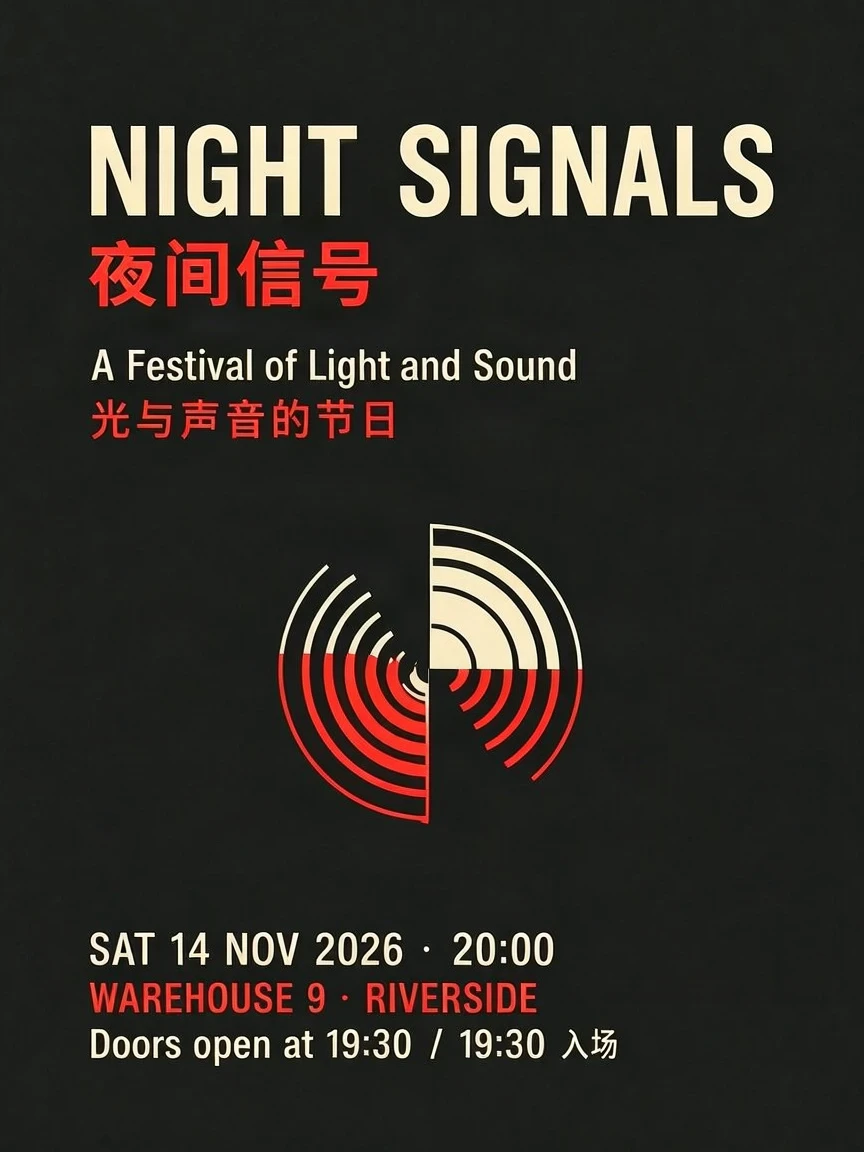
Most AI image models can make a poster that looks convincing from across the room. Far fewer can make one where the date, venue and ticket price are still correct when you zoom in.
We wanted a more useful answer than “it depends on the prompt.” So we built a fixed test set for MossImage: 22 cases, fixed seeds, the same model and settings the hosted product uses, and a scoring rule written down before we looked at the outputs.
The short version: 15 of 15 core cases passed, and 283 of 294 required text fields were correct. All 170 dish and service price pairs stayed with the right item. The two failures were long paragraphs. Both are published, not hidden.
What we tested
The core set covered three jobs people actually use MossImage for:
- Bilingual event posters, exhibition cards, product ads and a Chinese long-form poster.
- Menus and price lists, from a 16-item cafe board to a three-column, 21-item dinner menu.
- Layout and packaging: a four-zone poster, a product ad with a price badge, a coffee label and a shelf label.
A second boundary set pushed on conditions that are more likely to break text: low contrast, a 30-item menu at 512 px, a hand-written chalkboard, a dense event poster, and a long paragraph at two resolutions.
Every case used MOSS-Image SFT through fal.ai with 50 inference steps, CFG 3, the default negative prompt, the safety checker on, and prompt expansion on for text prompts. Each case has its own seed. The exact prompt, seed, tier and size are on each card in the benchmark.
What held up
The clean, flat layouts were remarkably stable.
A bilingual event poster rendered all seven fields: the English and Chinese title, subtitle, date, venue and door time. A Chinese exhibition poster rendered its title, subtitle, dates, venue and a three-line paragraph. A magazine cover kept its masthead, issue line, three headlines and both credits without dropping a word.
Menus were the strongest result. The 16-item cafe menu kept all 16 prices with the right dishes. The 21-item dinner menu did the same across three columns. A 15-item menu with V/GF/N dietary markers rendered every marker correctly. Even a 30-item menu at 512 px kept all 30 prices, and a hand-written chalkboard menu with 18 items stayed readable.
That is the part that matters for real work: the model is good at short, exact strings arranged in a clear layout.
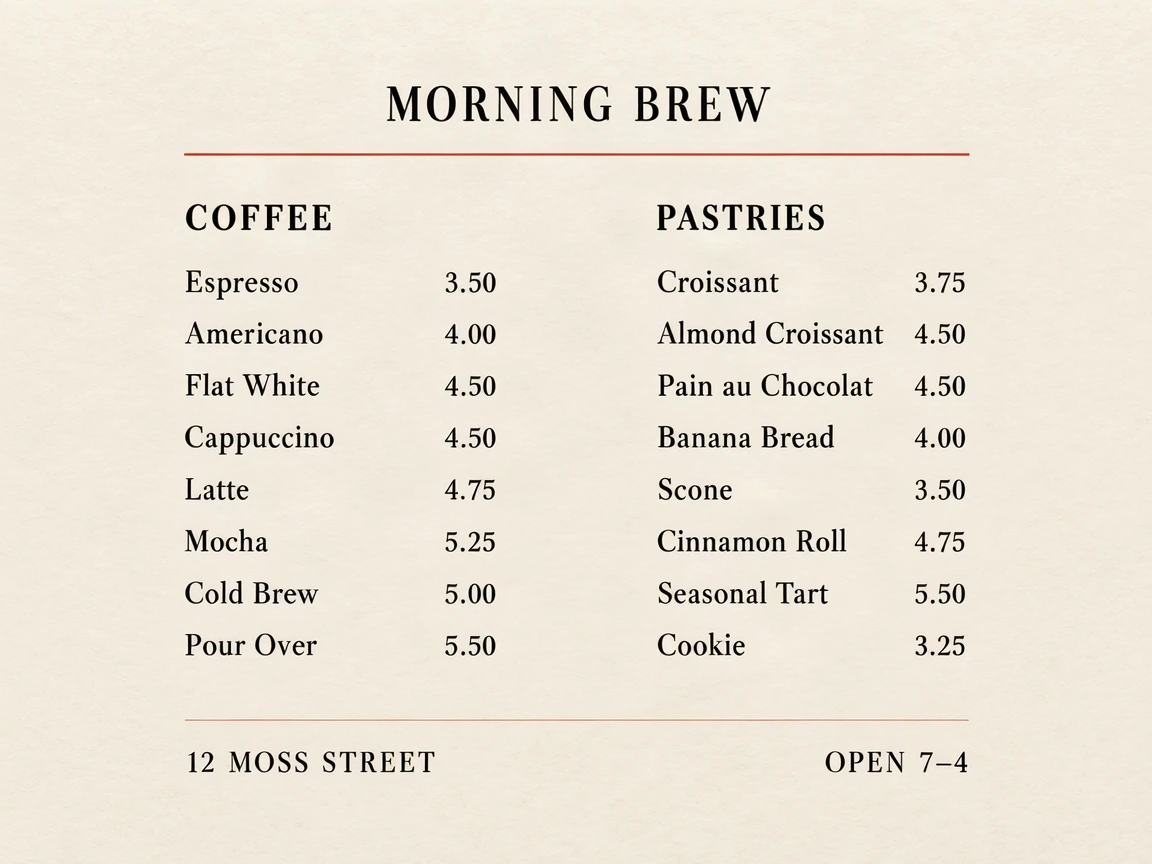
B1 · two-column cafe menu · 16/16 prices correct.
What broke
Both failures were long paragraphs at small type.
At 512 px, a dense artist statement lost its middle sentences. The opening line, the closing section and “FREE ADMISSION” survived, but the center of the paragraph collapsed into overlapping glyphs. Six of nine required fields were readable.
At 1024 px, with the same prompt and seed, the paragraph was almost entirely garbled. Only “FREE ADMISSION” came through. That is not a tidy result, and it is worth being precise about what it means: more pixels did not fix long body copy.
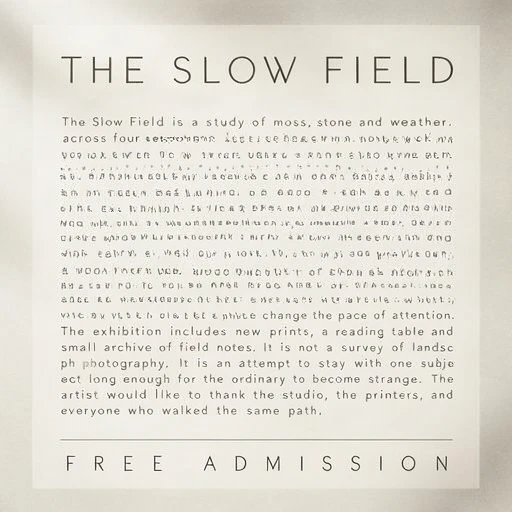
S6 · long paragraph at Draft 512 · 6/9 fields correct. The failure is published in full.
This is not a small edge case. A poster brief often includes an artist statement, a menu includes dish descriptions, and a packaging label includes ingredients. Those are paragraphs, not headlines.
Why long paragraphs fail
A diffusion model is not a typesetting engine. It is predicting an image. When a paragraph is small, the model has very little space to resolve each glyph, and the layout pressure pushes lines into each other. The model can produce something that looks like a paragraph at a glance while the actual letters are wrong.
Resolution helps with glyph detail, but it does not change the underlying layout problem. If the paragraph is too dense for the canvas, a larger canvas may simply give the model more room to produce a different kind of failure.
Prompt expansion can also work against exact copy. The hosted product enables expansion for free-form prompts because it often improves composition. For text-heavy work, the safer pattern is to quote the exact copy and keep each block short, so there is less for the model to rewrite.
The prompt rules that follow
These are the rules we would use before blaming the model:
- Quote the exact words. Put every headline, price and caption in quotes. Do not paraphrase the copy you need back.
- Give each block its own line. A title, subtitle, date, venue and ticket line should be separate lines, not one sentence with commas.
- Split long copy. If a paragraph is longer than two or three short lines, break it into separate blocks. A menu description should be one short line per dish.
- Say how many columns. “Two columns, eight items each, prices right-aligned” is a much better instruction than “make a menu.”
- Use Draft to check, Final or HD to deliver. Draft is cheap and fast; it is where you catch a dropped dish or a shifted price. Final and HD are for the version you hand over.
- Check every price against the source. The benchmark result is strong, but generative output is still probabilistic. A five-second proofread is cheaper than a reprinted menu.
The same rules apply to posters and packaging. A four-zone layout with the title top-center, dates top-right, venue bottom-left and ticket bottom-right landed exactly where requested. The model follows spatial instructions well when the instructions are explicit and the blocks are short.
What this means when you choose a tool
“Perfect text” is not a useful product claim. A better question is: which kinds of text does this tool handle, under which conditions, and what happens when it fails?
Our answer, based on the current snapshot:
- Short blocks, menus, price lists, bilingual posters and labels are a good fit.
- Long paragraphs at small type are not. Split them or set them in a layout tool.
- One render is not a guarantee. Check the copy before delivery.
- A benchmark should publish failures. If a tool only shows its best output, you cannot tell where the boundary is.
The full test set, including the two failures, is on the MossImage benchmark. If you want to run the same kind of prompt yourself, start with the menu generator or the poster generator.